Two things keep EV fleet managers up at night. The first is a car running flat in the middle of a shift, stranding a driver and a fare. The second is quieter but more expensive: not really knowing whether that shiny electric saloon is saving you money or quietly costing more than the diesel it replaced.
GridX Dispatcher tackles both. One screen watches your batteries through the day, and another tells you, vehicle by vehicle, what each car actually costs to run per mile. Here's how to set them up and read them.
Getting your EVs onto the dashboard
Open a vehicle under Fleet then Vehicles, and set its Vehicle Type to Electric. You'll get a few EV-specific fields to fill in: battery capacity (say 75 kWh), full range in kilometres (around 450 for that battery), the charging connector it uses (Type 2 AC, for example), and whether the driver has a home charging station. Save it, and the car shows up on the EV Fleet Dashboard.
You'll find that dashboard under Fleet then EV Dashboard.
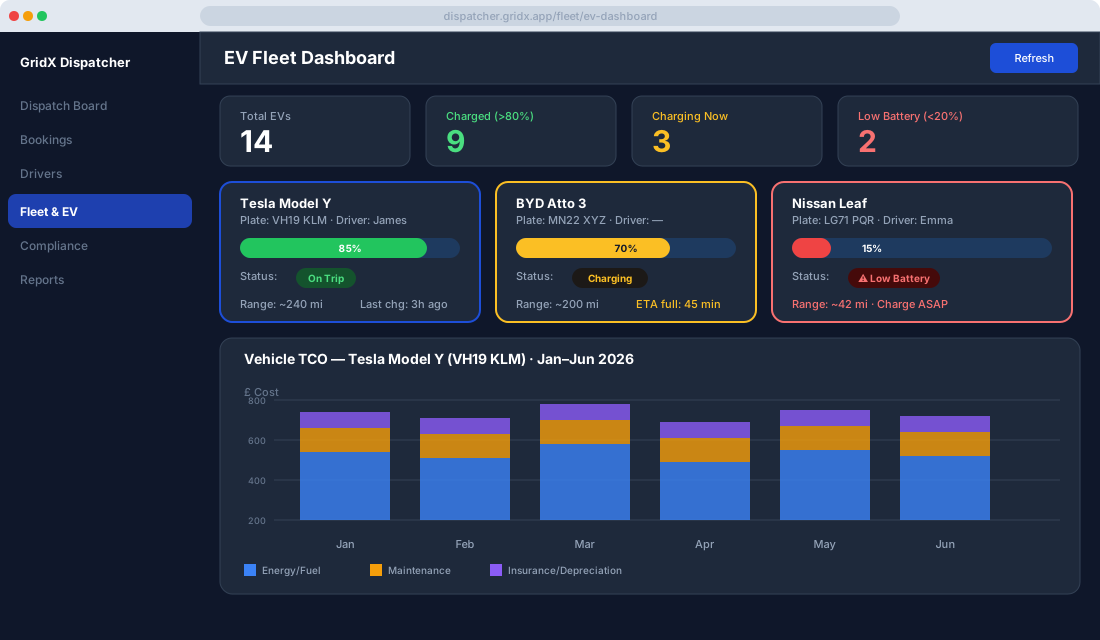
Across the top sit four numbers that tell you the state of the fleet at a glance: how many EVs you run in total, how many are charged above 80 percent and ready to dispatch, how many are plugged in and charging right now, and how many have dropped below 20 percent and need attention before they cause a problem.
Reading a vehicle card during the shift
Each car gets its own card. The battery shows as a colour-coded bar, and the colours mean what you'd expect: green above 60 percent is good to go, yellow between 30 and 60 means keep an eye on it, orange between 10 and 30 means plan a charge soon, and red below 10 means get it to a charger now.
Alongside the battery you see the estimated range left, who's driving it (or "Available" if it's free), and its current status, whether that's on a trip, charging, available, or idle. If it's plugged in, the card tells you roughly how many minutes until it's full.
When a car dips below your alert threshold, which defaults to 20 percent, the system doesn't keep it to itself. The dispatch board operator gets a red badge on the EV Dashboard menu, the driver gets a "head to the nearest charging point" prompt on their phone, and if you've asked for it, the fleet manager gets an email. You can move that threshold under Settings then EV Alerts then Low Battery Warning Level, so a long-range car and a short-range one can warn you at different points.
Click into any card and you'll find its charging history: every session with start and end times, the kWh added each time, the cost per session if you've entered your electricity tariff in Settings, and the running total for whatever period you're looking at.
What total cost of ownership actually means
Fuel is the cost everyone watches, but it's rarely the one that decides whether a vehicle earns its keep. Total cost of ownership pulls in everything else too: maintenance, insurance, tyres, and depreciation. Reduce all of that to a single figure, the cost per kilometre, and you've got the one number that lets you compare any two vehicles honestly.
For the figures to be right, the underlying records need to be current. Energy and fuel costs come through automatically, from charging sessions for an EV or fuelling records for a combustion car. Maintenance comes from the service records you log under Fleet then Maintenance. Insurance lives on each vehicle's Insurance tab as an annual premium, and the purchase price and depreciation schedule sit on its Financials tab. Keep those four fed and the rest takes care of itself.
Reading the TCO screen
Open Fleet then Analytics then Vehicle TCO, pick a car and a date range, and you get a monthly stacked bar chart. Blue is energy or fuel, amber is maintenance, and purple covers insurance and depreciation together, so you can see at a glance which months were quiet and which ones a big repair blew the budget.
Underneath, the same data lands as a month-by-month breakdown. Take a typical first quarter: January might come in around £340 on energy with no maintenance and £110 in insurance and depreciation, giving £450 total over 2,100 km, or about 21p a kilometre. February ticks up to roughly £505 once an £85 service lands, nudging the cost to 26p. Then March takes a £220 repair and a 2,300 km month to about £710, or 31p a kilometre. Seeing those numbers move month to month is what turns a vague hunch into a decision.
The Fleet Comparison tab puts two or more vehicles next to each other, which is where this really earns its place. Line an EV up against a combustion car of the same class and you can read the payback period straight off the per-kilometre figures, alongside total cost over the period and how often each car needs work. When you're ready to take it to the people who sign the cheques, Export gives you a PDF for the management meeting or an Excel file to push into your accounts.
Tyres, quietly feeding the numbers
The Tyres tab on each vehicle keeps track of brand, model, and fitment date per axle, the tread readings your team enters after inspections, and the mileage since the last change, with an alert when a tyre is getting close to the threshold you've set. Every replacement you log is counted as a maintenance cost, so it flows into the TCO figure without anyone having to remember to add it.
Questions operators tend to ask
Does the dashboard show battery levels live? It does, as long as the car's telematics device pushes live data, which most modern OBD-II EV dongles do. For anything without live telemetry, the driver can update the battery level by hand from the mobile app.
Can different vehicles depreciate at different rates? Yes. Each car carries its own purchase price, residual value, and depreciation period on its Financials tab, so an older runaround and a new executive saloon are costed on their own terms.
And how is this different from the standard fleet reports? Those reports are operational, telling you about trips, distances, and how hard each car is working. TCO Analytics is purely about money: what a vehicle costs you per kilometre, and when the maths says it's time to let it go.
Real-time battery monitoring keeps cars on the road instead of stranded, and the cost data tells you which of those cars deserve to stay there. Together they turn the move to electric from a leap of faith into something you can actually measure.