The handshake, written down
Walk into any neighbourhood in Pakistan and you'll find the same quiet system running everything. The kiranay wala lets a regular take groceries now and settle on payday. The pharmacist keeps a tab for the family two doors down. The wholesale market closes deals with nothing more than a nod and a name in a notebook. Business here runs on trust, and that trust is real money on the line.
The trouble with the notebook is the notebook. Pages tear, ink smudges, and "I'm sure I paid that last week" turns into an argument neither side enjoys. ClearRing's customer tools keep all of that warmth and add a memory that doesn't fade. Credit ledgers, loyalty points, and a full purchase history sit behind every customer, built for the way Pakistani shops actually trade.
Seeing everyone at a glance
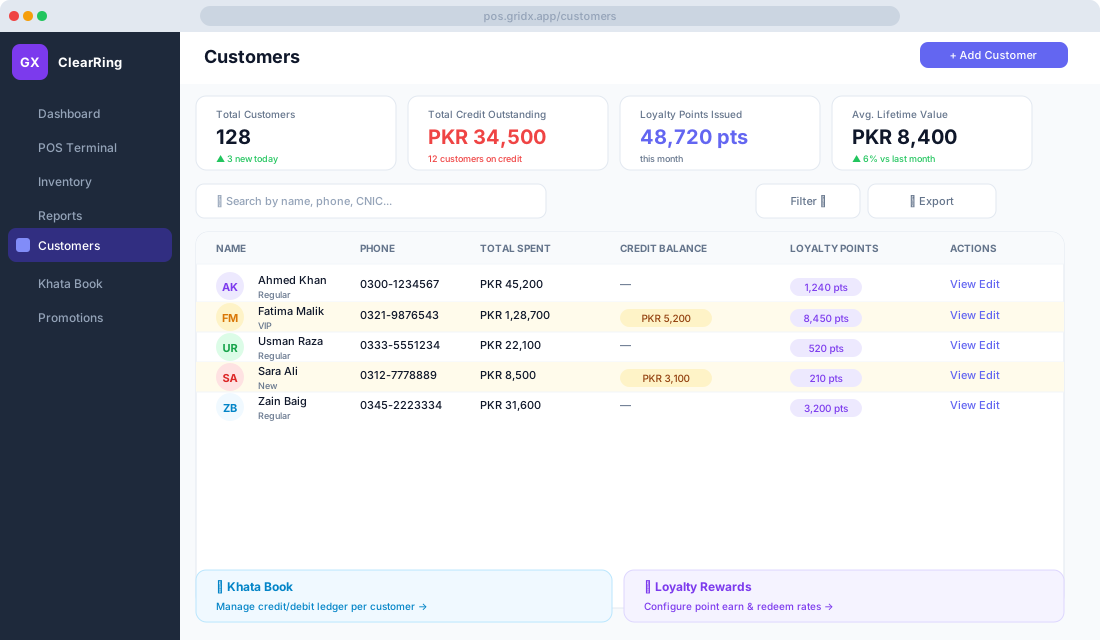
Click Customers in the sidebar and your whole book opens up, searchable and sortable. Each person shows their name and tier (New, Regular, or VIP), their phone number, and what they've spent with you over their lifetime. Anyone carrying a balance has their credit shown in amber, and unredeemed loyalty points sit in a badge beside them.
Looking for someone specific? Type any piece of a name, phone number, or CNIC into the search bar and they surface instantly. No scrolling, no flipping pages.
Getting a customer on file
To add someone, click Add Customer. The only two things you really need are a full name (the way it should read on receipts) and a phone number, which is what ClearRing uses to send receipts and loyalty messages. Everything else is optional but often worth it: a CNIC matters most for B2B credit, an address helps if you deliver, a credit limit caps how much any one person can owe you, and a loyalty tier sets how fast they earn and redeem.
You don't have to do this from the back office, either. A cashier can add a customer right at the till during checkout by tapping Add Customer and entering a phone number. If that number already exists in your records, ClearRing links the sale to the existing account automatically instead of creating a duplicate.
Tying a sale to a person
When a new sale begins, the cashier can attach it to a customer account, and that one small step unlocks three things. The sale can go on credit, marked unpaid and logged straight into the Khata. Loyalty points land on the customer's account on their own. And the purchase joins their history, so next time you can see exactly what they buy and how often.
To do it, tap the Customer field at the top of the cart panel and search by name or phone. That's the whole step.
The Khata, finally digital
The Khata Book is the part that feels most like home. It behaves exactly like the paper khata you already know, a running ledger of what each customer owes and what they've paid, except it never loses a page and you can search it in a second.
Find it under Customers then Khata Book, or jump straight there from any customer's profile. Inside, the logic is the same one shopkeepers have used for generations. A debit means the customer owes you, recorded when they take goods on credit. A credit means they've paid, recorded when cash comes back against their balance. The running balance is simply where things stand right now.
Recording a credit sale takes no extra effort. At the till, pick the customer, choose Credit / Khata as the payment method, and the amount drops into their ledger as a debit on its own. When they come back to pay, open their profile, go to the Khata, click Record Payment, enter the amount and how they paid, and confirm. A credit posts and the balance drops.
And when a customer insists they've cleared their dues, you don't have to argue from memory. Open their Khata, click Print Statement, and hand over a dated PDF showing every debit, every credit, and the balance. It settles disputes quietly and reminds people, gently, of what's still owed.
Rewarding the regulars
ClearRing's loyalty program runs in the background once you set the rules. Under Settings then Loyalty, you decide how points are earned (say, 50 points for every PKR 100 spent), what they're worth on redemption (perhaps 100 points knocks PKR 1 off a bill), the minimum a customer needs before they can cash any in, and whether points should quietly expire after six or twelve months.
After that it just happens. Attach a customer to a sale, finish checkout, and their points are calculated and added automatically. They even get a nudge by SMS or WhatsApp, something like "You earned 240 points! Total: 1,480 points." When a customer wants to spend those points, the cashier confirms their account is attached, clicks Redeem Points, enters how many to use, and the discount drops onto the cart.
Tiers that match how people actually shop
Tiers let you treat your best customers like your best customers. A New customer in their first three visits earns at the standard rate. A Regular, somewhere between four and twenty lifetime purchases, earns at one and a half times that. A VIP, anyone past twenty purchases or PKR 50,000 spent, earns at double and gets priority on their credit limit.
You can move people between tiers by hand, or let ClearRing promote them automatically once they cross a threshold. Set that up under Settings then Loyalty then Tier Rules.
Knowing your customer base
The Reports module includes a dedicated Customer Report that pulls the wider picture together: how many new customers you've won in a period, how much credit is outstanding across the board, who your most valuable customers are by lifetime spend, how often people come back, and how the loyalty points you've issued compare to what's been redeemed.
Staying in touch without lifting a finger
ClearRing can message customers automatically, and the settings live under Settings then Notifications then Customer Messaging. It can send a receipt by SMS or WhatsApp the moment a sale closes, ping a customer when their points change, send a weekly reminder to anyone carrying credit, and broadcast a promotion to a chosen segment when you've got something worth shouting about.
Keeping that data safe
All of this customer information is held in line with Pakistan's personal data protection guidelines. It's encrypted both at rest and in transit, CNIC and phone numbers are masked when you export, and access is role-based, so a cashier can ring up sales without ever seeing your financial summaries. Only managers and owners get the full picture.
A few things worth doing
Attach a customer at the till even for small sales. Each one feels trivial, but over months the history compounds into the kind of insight you can't buy. Set a credit limit per person so no single customer can quietly run up a balance you'll struggle to recover.
Send Khata statements over WhatsApp once a week. People appreciate the honesty, and a gentle reminder gets you paid faster than silence does. Pour a little extra care into your top ten percent through the VIP tier, because keeping a loyal customer costs far less than finding a new one. And lean into Ramadan and Eid with a double-points run; it's exactly when baskets grow and habits form.